The storyboard is one of the most useful tools in film, television, and advertising. It’s been used for years to plan productions efficiently and precisely — and today, in the age of AI, where we no longer need actors and camera operators, the storyboard turns into a finished video with the click of a button.
In this article, I’ll walk you through how to work with a storyboard in the Seedance 2 model — and as always, I’ll give you a real-world example you can apply at home.
What Is a Storyboard and Why Does It Matter So Much for AI Creators?
In Hebrew it’s called a “story board” — it’s essentially a visual planning document for a production, very similar to a comic book. It lets you illustrate the story itself along with various notes like shooting directions, audio, acting cues, and more. When producing a film or commercial, the storyboard serves as a roadmap that guides the entire production to completion.
Traditionally, a storyboard saves a lot of money — the director and the entire production team can see the full flow of the film, shot by shot, identify problems, and make all the changes before the actual production begins. And when a cinematic production can cost tens or even hundreds of millions of dollars, that’s definitely a money-saving tool.
A lot has changed in the age of AI. Productions that once required dozens of people and weeks of work with massive budgets have now become something a single person can do with AI — quickly, and on a budget of just a few dollars.
But the storyboard still remains relevant and important. As an AI commercial creator, for example, the storyboard is a tool I use to present ideas to clients and get their approval. When my client receives a storyboard, they don’t need to struggle reading a script and trying to imagine it — they see a visual representation and can quickly understand whether it’s the direction they’re looking for.
The Storyboard Is the New Prompt
I’m not sure what stage you’re at in the world of AI video generation, but when I was starting out, the capabilities were fairly limited. We got the best results by generating very short video clips between two images, and we had to break every scene into small pieces — sometimes a single minute of film required full days of work.
The Seedance model changed the rules of the game in many ways, and one of them is its ability to receive a storyboard and produce a video based on it. Not perfect, there are glitches — but a significant improvement in our ability to communicate with the AI and tell it what we want to do.
Thanks to this working method, creating AI films has become less of a guessing game and more of a clear plan built on a well-thought-out roadmap.
How to Create a Storyboard
There are different tools for creating a storyboard, but it seems like we’re converging toward AI systems that simply understand what we want and save us the need to use multiple separate tools.
Personally, I built myself an agent that prepares storyboards for me, defined exactly how I want to receive the output, and I did it mainly to communicate with my clients and present ideas to them in a sharp and clear way. When I built that agent, I hadn’t even dreamed of the day I’d be able to feed the storyboard directly into a video generator and get a film back.
These days, creating a storyboard is pretty simple — sometimes it’s enough to just tell the chat to create a storyboard without going into too much detail, and you’ll get a decent result. But to avoid surprises, I asked the chat to include the timing of each shot along with a brief description.
Film 1 — How I Created the Video: The Storyboard Phase
The first step is coming up with the idea — and here I’ll give you some “do as I say, not as I do” advice. My goal wasn’t to create the next big hit. My goal was to test the model’s capabilities and walk you through the production process. The most important thing is storytelling — but for this one, I left that to the AI. That’s totally fine for learning purposes, but anyone who wants to create at a professional level needs to put the emphasis on building the story.
We’re heading into a world where AI tools are becoming incredibly easy to use, and soon everyone will be able to create things like this. The only advantage I see that will remain uniquely human is the ability to bring a good story and a compelling narrative. So it’s definitely worth investing in that aspect.
But as I said — what I did here is not exactly that. I simply asked the AI to give me an idea for a short video featuring an animal trying to get something, inspired by that creature from the Ice Age films that’s always chasing the acorn.
I almost randomly picked one of the ideas, and the next step was to ask the AI to create a storyboard for producing an AI film using Seedance 2. To make it a bit more challenging and interesting, I asked the chat to build a script for a 30-second AI video — because as we know, Seedance’s video model currently generates clips of up to 15 seconds, so we need to split the video into two separate 15-second clips. In the end, because I was a little stingy with the credits (just being honest), I decided to go with 20 seconds.
Accordingly, the chat prepared two prompts for me:
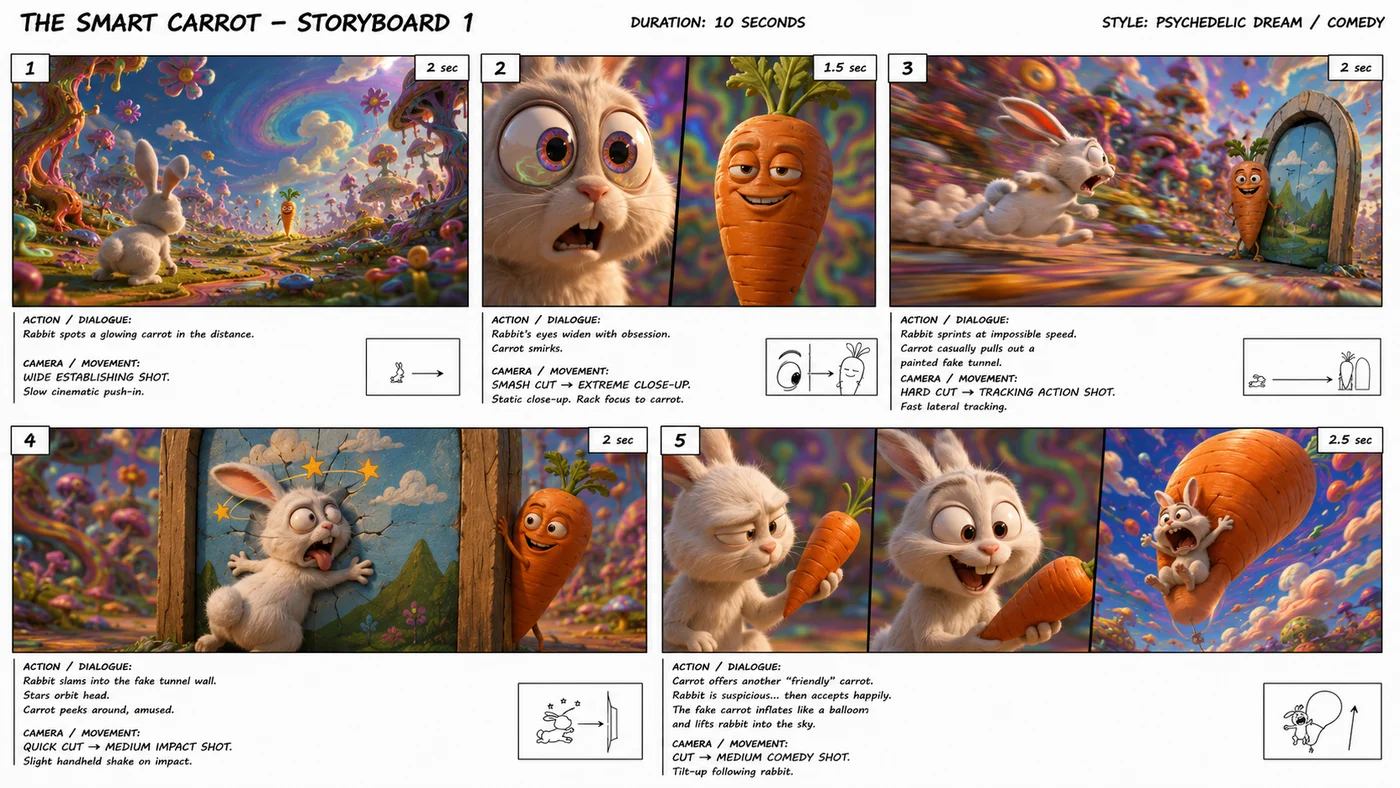
STORYBOARD 1 — THE SMART CARROT
(10s)
Shot 1 — 2s
WIDE ESTABLISHING SHOT
Psychedelic dream meadow. Melting trees, floating flowers, impossible colors, surreal sky.

Tiny adorable rabbit enters frame and spots a glowing mischievous carrot far away.
Camera: slow cinematic push-in.
Shot 2 — 1.5s
SMASH CUT → EXTREME CLOSE-UP
Rabbit's eyes widen dramatically, pupils dilate. Obsession mode.
Quick rack focus to carrot smirking.
Camera: static close-up.
Shot 3 — 2s
HARD CUT → TRACKING ACTION SHOT
Rabbit sprints at absurd speed through warped dream terrain.
Carrot calmly pulls out a painted fake tunnel doorway.
Camera: fast lateral tracking.
Shot 4 — 2s
QUICK CUT → MEDIUM IMPACT SHOT
Rabbit slams face-first into fake tunnel wall. Cartoon flatten effect. Stars orbit head.
Carrot peeks around edge, amused.
Camera: slight handheld shake on impact.
Shot 5 — 2.5s
CUT → MEDIUM COMEDY SHOT
Carrot offers a second "friendly" carrot.
Rabbit suspicious... then accepts happily.
The fake carrot suddenly inflates into giant balloon and lifts rabbit screaming into the sky.
Camera: tilt-up following rabbit.
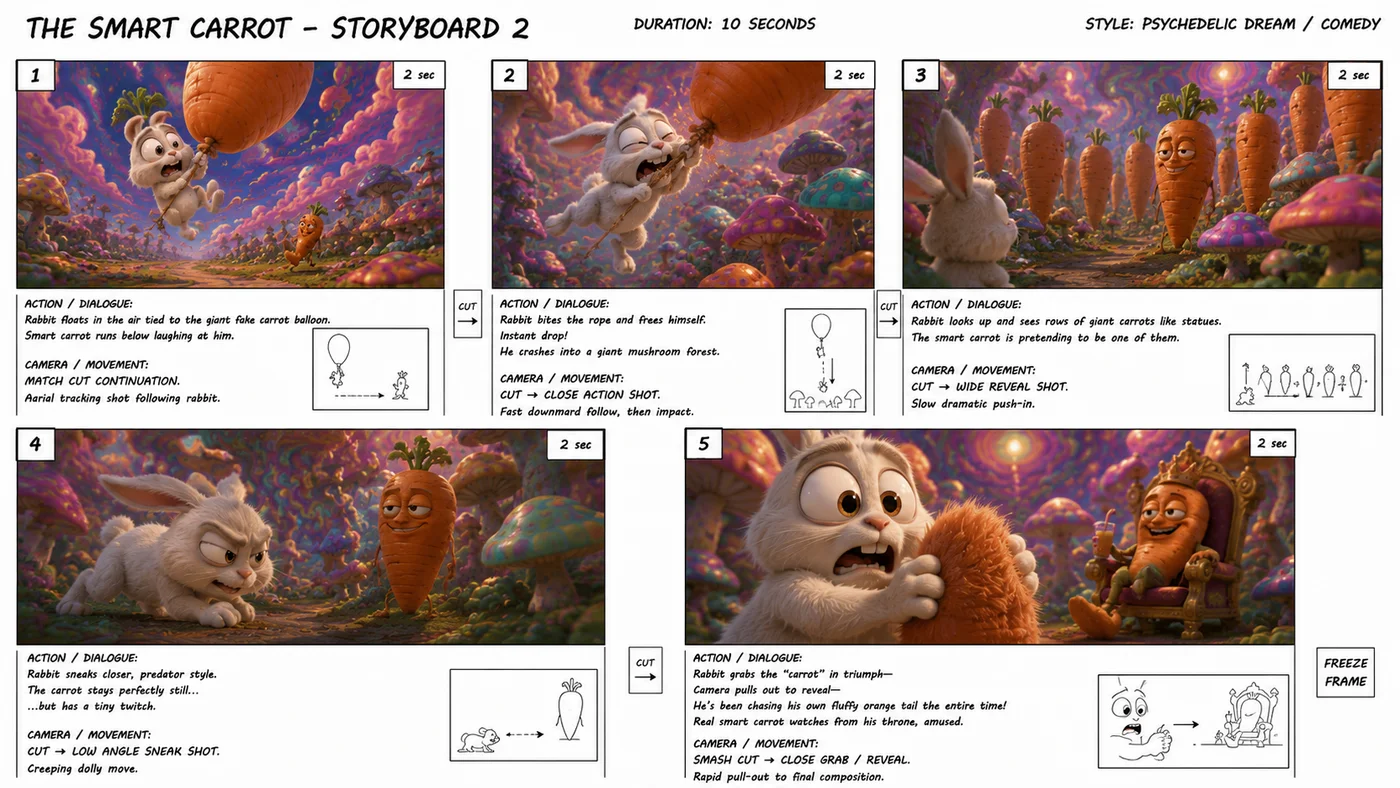
And the second prompt, which is the continuation:
STORYBOARD 1 — THE SMART CARROT (10s)
STORYBOARD 2 — THE SMART CARROT
PART 2 (10s)
Shot 1 — 2s
MATCH CUT CONTINUATION
Rabbit floating helplessly under giant fake carrot balloon.
Below, smart carrot runs through psychedelic terrain laughing.
Camera: aerial tracking shot.

Shot 2 — 2s
CUT → CLOSE ACTION SHOT
Rabbit angrily bites balloon string.
Instant drop.
Crashes into giant mushroom forest.
Bounce physics comedy.
Camera: fast downward follow.
Shot 3 — 2s
CUT → WIDE REVEAL SHOT
Rabbit lifts head.
Sees rows of giant carrots like statues.
One is clearly the smart carrot pretending to be still.
Camera: slow dramatic push-in.
Shot 4 — 2s
CUT → LOW ANGLE SNEAK SHOT
Rabbit tiptoes predator-style.
Eyes narrowed.
Carrot remains frozen like statue.
Tiny twitch almost gives it away.
Camera: creeping dolly move.
Shot 5 — 2s
SMASH CUT → CLOSE GRAB / FINAL REVEAL
Rabbit triumphantly grabs the "carrot."
Camera rapidly pulls out to reveal—
he's grabbing his own fluffy orange tail.
Real smart carrot sits on absurd throne in background, sipping juice.
Freeze frame ending.
From Storyboard to Video
The next step is creating the video in two parts — and this is where another impressive capability of the Seedance video generator shines through: the ability to create a continuation of an existing video. This is a hugely important feature, because it helps us maintain consistency — not just in characters, but in overall style, including the audio track.
Anyone who’s gained experience with tools like Kling 3 or Kling 2.6 knows these problems well. You can generate short, consistent clips, but when you try to edit them into one film, you end up with a complete lack of uniformity in the soundtrack — which requires a lot of creative problem-solving, heavy editing, and layering in music and effects at the post stage. Seedance was the first to offer a real solution to this problem.
I’ll talk more about these capabilities in a moment, but let’s get back to the video for now. So in the first step, I uploaded the Part A storyboard to the Electric Puma AI video studio along with the following prompt:
Create a premium cinematic 3D animated short film exactly following the attached storyboard.
Maintain perfect visual continuity across all shots.

Character: tiny adorable hyper-expressive white rabbit with soft fluffy fur and exaggerated cartoon facial animation.
Secondary character: mischievous intelligent carrot with expressive face and smug personality.

World: psychedelic dream universe, surreal LSD-like visual logic, melting landscapes, impossible colorful skies, giant mushrooms, dreamlike environmental distortion.

Style: premium animated short film quality, expressive physical comedy, polished cinematic lighting, dynamic camera movement, fast comedic timing.

Important:

Follow the storyboard shot-by-shot exactly.

Preserve the exact camera language, framing, timing, and transitions shown in the storyboard.

Keep character design perfectly consistent.

Smooth animation with strong squash-and-stretch cartoon physics.

No dialogue.

High-end cinematic rendering quality.
Quick note — a lot of people use words like “Pixar” or “Disney” to describe the visual style. In one of my attempts, I used the word “Pixar” — which the chat had accidentally slipped in. That’s generally a reliable recipe for a rejected prompt, because the model is very sensitive to copyright issues. For some reason it went through that time — I’m not sure why. But in general, avoid using words like Pixar or Disney, and just describe the style you’re going for.
After Part A was generated, I created Part B — this time combining both of Seedance’s capabilities: the ability to work from a storyboard, and the ability to generate a continuation.
I uploaded the Part B storyboard along with the first generated video, and asked the model to create the continuation using the following prompt:
Continue the attached existing video seamlessly for exactly 10 more seconds. This is a direct continuation, not a new film.

Follow the attached storyboard exactly.

Maintain:
identical rabbit design
identical carrot design
same psychedelic dream universe
same lighting, color palette, rendering quality
same animation style and comedic pacing
seamless continuity from previous clip

Important:
Match the exact ending frame energy of the previous video.
Preserve shot timing, camera language, and transitions from the storyboard.
Smooth expressive cartoon animation with premium cinematic 3D quality.
No dialogue.
The storyboard ensured that the story would continue according to plan, and the video reference contributed to visual consistency and seamless continuity.
I hope you picked up something useful from this guide. If you have more questions, feel free to reach out. You’re also welcome to follow our work on Instagram and our other social channels to get tips and see more work from Electric Puma Studio.