
You’ve been asking how to build a WhatsApp AI agent, and why I still hadn’t written a guide about it. The truth is, I’ve wanted to write this guide for a long time, but I had quite a few hesitations.
There are several ways to build an AI assistant that talks to you through WhatsApp. You can do it with Anthropic’s Claude Code, with OpenAI’s Codex, or with other tools. And it doesn’t even have to be WhatsApp — some people will tell you Telegram is the better choice, since it was built from the ground up to work well with bots.
If that option interests you, you can also check out my guide to building an AI agent on Telegram with Claude.
But I asked myself a simple question: which approach would give most people the most value in the least amount of time? What would be easy to set up in minutes, without getting too complicated, and without giving up the capabilities that actually matter?
In the end, I chose to build this guide around Base44.
Contents
- 1. A Spoiler, But a Good One
- 2. What Can You Do With a WhatsApp AI Agent?
- 3. A Few Things Worth Knowing
- 4. Building a WhatsApp Agent
- 5. Base44 or Claude Code?
- 6. The Quick Way
- 7. Frequently Asked Questions About WhatsApp AI Agents
- 7.1. What's the difference between a WhatsApp AI agent and a regular WhatsApp bot?
- 7.2. Do I need to know how to code to build a personal WhatsApp assistant?
- 7.3. What permissions should I give an AI agent on WhatsApp?
- 7.4. Does a WhatsApp agent keep working when the computer is off?
- 7.5. Which is better for a personal agent — WhatsApp or Telegram?
A Spoiler, But a Good One
I hope you enjoy reading what I write about AI. But if you’re in a bit of a hurry, feel free to jump straight to the hands-on part and go through it step by step. My estimate: setting up and launching the agent will take 45 minutes at most, and for many of you, even less.
And if your time is especially valuable, there’s a quick-install option waiting for you at the end of the article. Instead of going through the whole process, you can click a link, scan the code, approve the connections, and launch the agent.
Won’t you at least buy me a coffee for saving you all that work?
What Can You Do With a WhatsApp AI Agent?
A WhatsApp assistant that you can even give voice instructions to isn’t just a gimmick. It’s a working tool that can become a meaningful part of your daily routine from day one. And even if you’re not in the business world, I’m sure you’ll find a lot of value in a personal assistant on WhatsApp.
Fair warning: this can turn into a habit that’s very hard to break. Once you get used to having someone to send an idea, a task, or a reminder to the second it pops into your head, you won’t want to go back to the old way of doing things.
Connecting to WhatsApp opens another door into the world of AI. But I don’t want to speak in slogans, so here are a few genuinely useful examples.
Never Forget Birthdays
None of us wants to forget an important birthday. We want to make friends and family happy and wish them a happy birthday on time. For that, there are reminders on social media, Google Calendar, and I know people who still write everything down in pen on a paper calendar.
With a personal agent, you can connect your calendar and ask it to remind you every morning — or the day before, if you prefer — whose birthday is coming up.
Personal Secretary
You’re stuck in traffic and a thought suddenly crosses your mind. Maybe you remembered something urgent you need to do tomorrow, or an idea for a new project just popped up. If you don’t write it down immediately, there’s a good chance it’ll disappear.
I know people who send WhatsApp messages to themselves. Now you can just send the message to the agent instead, and it will log it and remind you at the right time.
Invoice Collection
Collecting invoices for tax and VAT reports is one of the most tedious tasks in a freelancer’s life. But it has to be done.
Collecting invoices through WhatsApp isn’t a new idea — I’ve been using a solution like this for years. But a WhatsApp agent equipped with AI can deliver a lot more value than simply saving a file into a folder.
Shopping List
When I started experimenting with a personal assistant, my first attempt was building an agent for a shopping list. There’s hardly a supermarket trip where I don’t remember on the way home that I forgot to buy the one item that was the whole reason I went to the store in the first place.
Honestly, I didn’t expect it to be this useful. That simple action turned out to be one of the agent’s most powerful capabilities, as far as I’m concerned.
Collecting Important Information From WhatsApp Groups
Who among us isn’t a member of a few WhatsApp groups that bombard them with messages and discussions? I’m in groups about automation, AI video creation, and a few other topics close to my heart.
On one hand, these groups are great for getting help and learning a lot. On the other hand, they’re a constant drain on your attention all day long. Then you wake up in the morning to find 341 notifications. You don’t want to miss anything important, but good luck finding it in all that noise.
A personal agent can help collect and summarize the important things, instead of you having to scroll through hundreds of messages yourself.
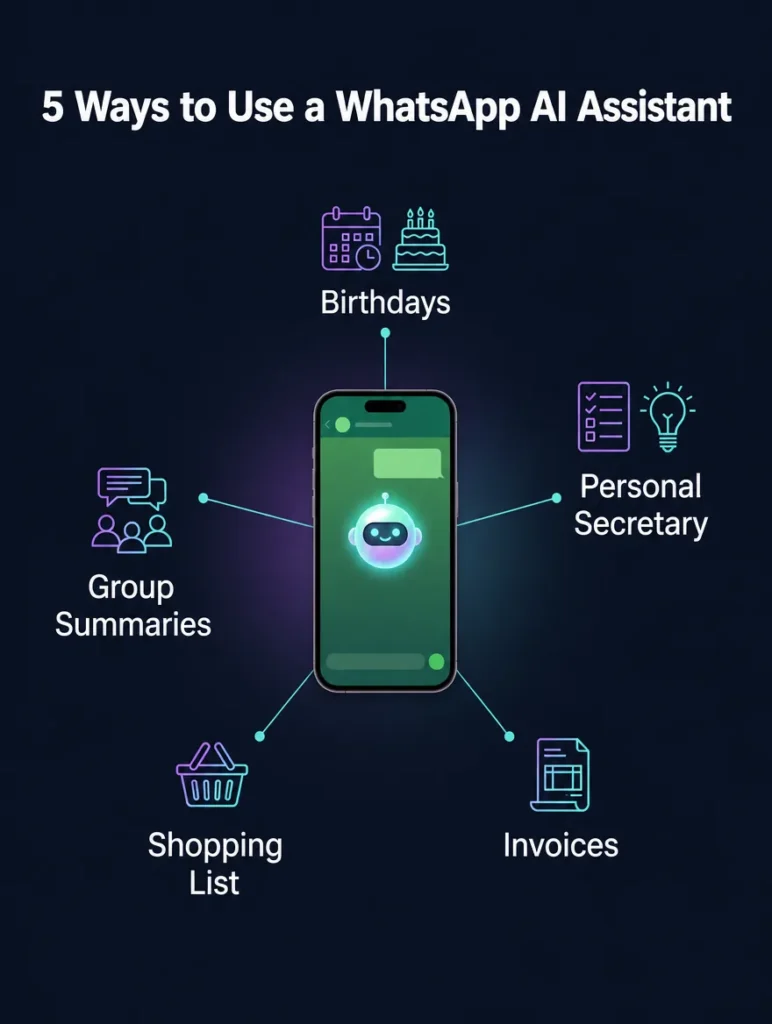
These are just a few ideas from my own world, things that are useful to me personally. Every person has different occupations, hobbies, interests, and needs, and will need different capabilities accordingly.
That’s one of the interesting things I get to do as an AI automation studio working with individual clients. I talk with the client, understand what they actually need, and build them an AI system that fits their life — not one that just looks impressive in a demo.
A Few Things Worth Knowing
This guide covers building a WhatsApp agent using Base44. Fortunately, the platform also offers a free plan that lets you start working with a useful agent, though the free account is limited in daily and monthly credits.
Heavy users may prefer a paid account. The basic package costs $16, and most people won’t need more than that.
I want to be clear about something: this isn’t a payment for the agent itself. It’s a payment for using the Base44 platform, so you get access to additional platform capabilities, not just the personal assistant’s functions.
One of my main concerns was what would happen if a stranger sent a message to the agent and tried to gain access to my personal information. In a test I ran, when a message was sent from a different phone number, the system required verification via a code. As far as I’m concerned, that’s the crucial layer of protection that prevents someone else from connecting to your agent without approval.
Building a WhatsApp Agent
Now for the hands-on part: building a personal assistant in Base44.
1. Go to Agents
Log in to Base44 and select the Agents option, which appears on the right side.
2. Define What You Want to Create
Open the chat and explain to the system what kind of agent you want. On the left side you’ll see various settings, but you don’t have to start editing each one manually. You can just work through the chat, and it will help you tailor the agent’s settings to your needs.
If you’re not sure how to start, you can use the following prompt:
I want to build an agent called "Personal Assistant" to help me with simple everyday tasks.

Your responsibilities:

Manage my reminders and shopping list.
Track the events on my Google Calendar.
Perform actions in my email account.
Every morning, send me a list of the important reminders for that day.
You need to be connected to Google Calendar, Google Sheets (to log tasks and shopping lists), Gmail, and of course the WhatsApp account through which we'll communicate.
This prompt requires connecting four systems:
- Google Calendar, to track events and reminders.
- Google Sheets, to store tasks and shopping lists.
- Gmail, to perform actions in your email account.
- WhatsApp, through which you’ll talk to the agent.
3. Connect the Systems
During setup, you’ll need to approve and connect the systems the agent will use. There are many connector options available, and the choice naturally depends on what you want the agent to do.
For the agent we’re building here, you’ll need to set up connections to Google Calendar, Google Sheets, and Gmail.
4. Connect WhatsApp
To connect the agent to WhatsApp, you’ll be asked to scan a QR code. After scanning and approving it, the agent will be added to your chat history. From your perspective, it becomes a contact you can name and send messages and instructions to.
From here, you can start talking to it, sending it tasks, and checking what other adjustments you’d like to make.
Base44 or Claude Code?
You can also build a similar agent using Claude Code. I have a fairly advanced agent I talk to through Claude Code, and it can perform complex actions for me. But in my experience, setting up the agent in Base44 is faster and simpler, mainly because you don’t have to deal with the same level of hassle connecting WhatsApp.
There’s also a difference in entry cost. Claude Code doesn’t offer a free tier, whereas here you can start with a basic agent at no cost.
Another important difference is availability. My agent in Claude Code doesn’t run when my computer is off. That’s not always critical for my day-to-day work, but there’s one thing that really matters to me: not forgetting things. I want every idea that comes to mind to be saved immediately.
That’s why I use both systems together. The WhatsApp agent can log things in Google Sheets and Google Calendar, and Claude Code can also access those same information sources. That way, each one does what it’s good at, and both work off the same data.
For more examples, ideas, and updates on AI tools, you can follow Electric Puma’s Instagram page.
The Quick Way
If you want the quick way, all you have to do is say: “Lior, how about you swing by for coffee, and while you’re at it, set up this WhatsApp agent for me?”
And I’ll say: “What’s the problem? It takes a second. Just read the instructions.”
And you’ll say: “Forget it, just handle this for me. Coffee’s on me.”
So go ahead, send me a coffee, click the link, and everything will run itself. You’ll need to scan the code and approve the connections, and in no time you’ll have a personal assistant that can manage your calendar, reminders, shopping list, and more.
To install the agent, click the link. It will take you to Base44, where you’ll need to create an account. You can do that in one click using your WhatsApp account. The conversation will then begin. The first thing to do is ask it — in any language you prefer — to set up all the connections. It will immediately give you a QR code to scan and guide you through the remaining connections. The whole process should take no more than a minute.
If you’re happy with it and would rather not owe me a coffee, you can buy me one.
Frequently Asked Questions About WhatsApp AI Agents
What's the difference between a WhatsApp AI agent and a regular WhatsApp bot?
A regular WhatsApp bot usually operates according to predetermined scripts and rules, while an AI-based WhatsApp agent can understand free-form instructions, use context, and perform actions through connected systems. For example, instead of choosing an option from a menu, you can ask it in plain language to save a task, update a shopping list, or check a calendar event. What it can actually do in practice depends on the connections and permissions it’s been given.
Do I need to know how to code to build a personal WhatsApp assistant?
Not on the path described in this guide. Most of the setup is done through a conversation with Base44, scanning a QR code, and approving the necessary connections, so you can set up a personal WhatsApp assistant without writing any code. Technical knowledge becomes more important when you want complex logic, integrations that aren’t available as a ready-made connector, or deep control over how the system operates.
What permissions should I give an AI agent on WhatsApp?
You should only give the agent the permissions it actually needs for the tasks you’ve asked it to do. If it manages reminders, lists, a calendar, and email, go through the access to Google Sheets, Google Calendar, and Gmail separately, and avoid connecting any service you don’t need. After setup, check what the agent is actually able to read and change, and don’t send it sensitive information before you understand where it’s stored and who can access it.
Does a WhatsApp agent keep working when the computer is off?
On the Base44 path described in this guide, the agent doesn’t depend on your personal computer staying on in order to receive a WhatsApp message from you. That’s one of the practical differences compared to Lior’s local agent in Claude Code, which doesn’t run when his computer is off. That said, whether a specific task actually gets carried out still depends on the connection to the required service being active and its permissions not having expired or been revoked.
Which is better for a personal agent — WhatsApp or Telegram?
WhatsApp suits people who want to talk to their agent in the same place they already use throughout the day, while Telegram is especially suited to those who prefer a flexible bot environment and don’t mind working in an additional app. The right choice depends less on which platform is “better” and more on your usage habits, the connections you need, and how you choose to set things up. In this guide, we chose WhatsApp to minimize friction in everyday use.