Sometimes the most eye-catching videos online don’t cost a lot of money and don’t require hours of work.
The sticker peel effect is the perfect example of this. One image, the right prompt, and 6 seconds that stop the scroll. It’s been blowing up on social because it has everything a great hook needs — a moment of surprise, immediate movement, and curiosity that pulls you forward.
In this post, I’m going to show you exactly how to create it with AI — and how you can integrate it into real AI video marketing content.
What’s Going to Happen Here
Technically, this is fairly straightforward. The more important point is your creativity — the ability to take the technical side and weave it cleverly into the content you’re creating. This effect can be done with any character or object, whether it was created with AI or is a completely real photograph.
All you need: one image and one prompt.
Creating the Sticker Effect — Step by Step
Step 1 — Choose an Image with a Clear Object
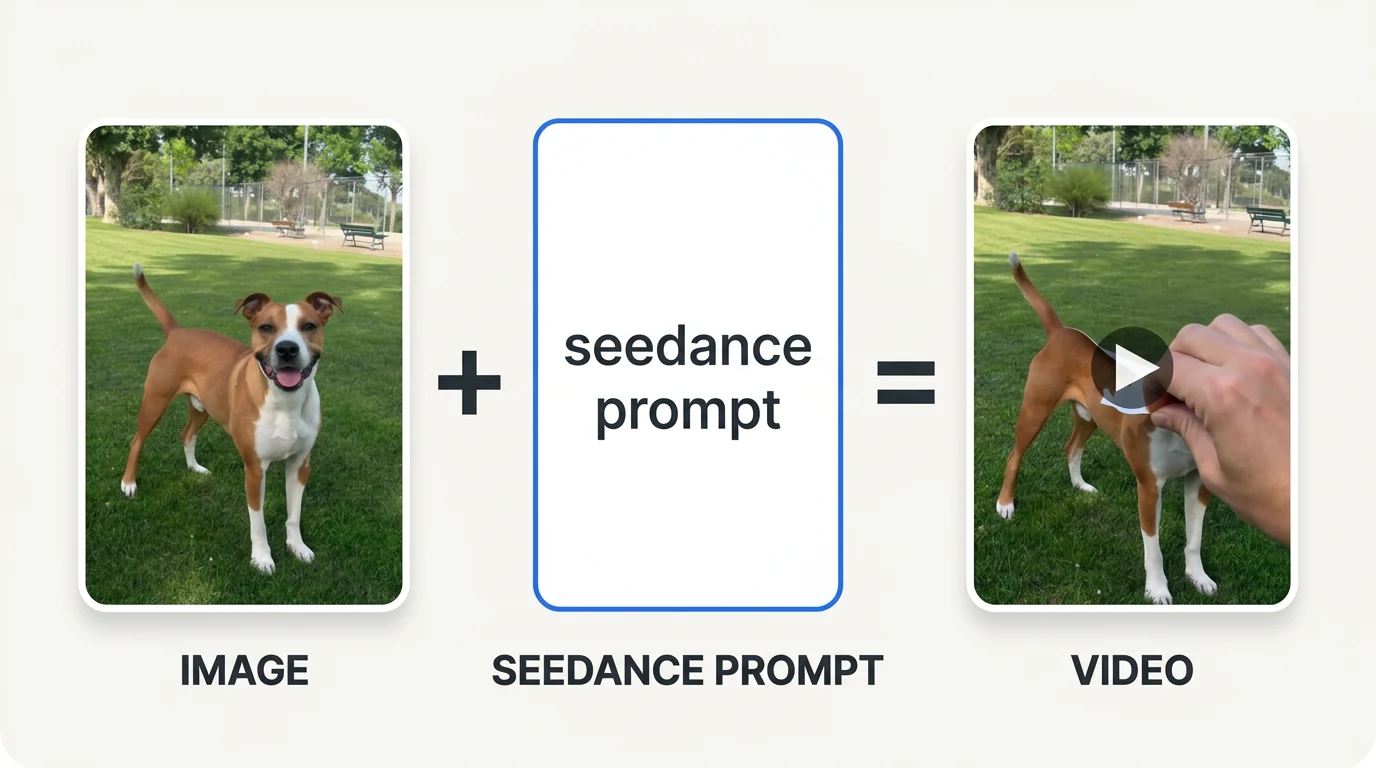
The first thing you need is an image with a distinct object that you want to “peel” from the background. I used a photo of a dog in a park, but it really can be any image you want — a product, a logo, a character, an animal.
The more defined the object is and the more it stands out from the background, the more natural and convincing the AI animation will be.
Step 2 — Upload to Seedance 2 and Choose 6 Seconds
Upload the image to Seedance 2 and choose to generate a video of 6 seconds. This is the ideal length for this effect — long enough for the AI to build the movement naturally at a reasonable pace, and not so long that the viewer loses interest.
Step 3 — Paste the Prompt and Click Generate
The Full Prompt:
The dog is a die-cut sticker attached to the original photograph. A realistic hand enters the frame and peel of the entire dog sticker from top to bottom. The peeling progresses gradually and naturally until the entire main dog has been detached from the image. Once the dog is fully removed, only the empty background remains. The peeled sticker preserves every detail of the original subject, including shape, colors, textures, markings, clothing, facial features, materials, and proportions. After the sticker was removed, the hand is presenting it to the camera and it has a realistic matte white outlines becomes visible along the peeling edge.
What Actually Happens
The AI creates a motion sequence where the object detaches from the background like a sticker being peeled — starting from the corner, gradually, until the background is revealed behind it. The result: a short moment that looks perfect for Instagram Reels and TikTok viral videos.
Why This Effect Works So Well
Our brain is used to flat images. So when a character or object suddenly detaches from the background as if it were a sticker, there’s a brief moment of confusion and curiosity — and that’s exactly what stops the finger.
The effect works because it does three things simultaneously:
- Breaks expectations — the viewer has seen thousands of images, but not this
- Creates immediate movement — already in the first second it’s clear something is happening
- Generates curiosity — what happens next? Where is the sticker going?
That’s what makes people stop, rewatch, and sometimes even share.
Marketing Uses — Beyond Funny Videos
This effect isn’t just for fun content. You can also integrate it into ads and business content in a way that feels sophisticated, not gimmicky.
A few ideas:
- Peeling a product off a promotional poster — a presentation that feels different from the usual
- Revealing a business logo — an opening for a brand video
- Introducing a new product — pulling it out of a virtual package
- Revealing a sale or discount — the peel reveals the price
- Transitions between scenes — in a longer commercial video
- Growth videos — a childhood photo being peeled away to reveal “today”
- Hooks for Reels and TikTok — a visual hook before the content begins
The simple rule: the stronger the connection between the object and the message, the better the effect works — and it feels like a creative choice, not a thrown-in gimmick. Check out more techniques on our blog.
Q&A
Q: Do I have to use Seedance 2 specifically, or are there other tools that can create the same effect?
A: Seedance 2 works great with this prompt, but the concept is also possible with other tools like Kling or Runway. The difference will be in the quality and precision of the movement. At this stage, Seedance 2 delivers the highest quality output for this type of effect.
Q: Does the effect work better with AI-generated images or real photos?
A: Both work. AI images sometimes give cleaner edges that make it easier for the AI to “peel,” but real photos with a distinct background will work just as well. The rule is: the more the object stands out from the background, the better the result.
Q: Is 6 seconds the ideal length, or can you play around with it?
A: 6 seconds is the sweet spot for social content — long enough for a complete effect, short enough to keep attention. You can try 4 seconds if you want faster movement, or 8 seconds if there are multiple objects peeling in sequence.
Summary
The sticker effect is a great example of the fact that in AI videos, you don’t always need a complex prompt or complicated editing to create something that stands out. Sometimes a simple idea, one good image, and the right prompt are enough to create a visual moment that stops the scroll.
The technical part is the easy part. The real challenge is finding the creative idea that uses the effect in a way that serves a story, a brand, or a message — and that’s where human intelligence comes in, something no AI will ever replace.
If you came up with an idea for one of the uses I mentioned — share it in the comments. Follow along for more on Instagram @electric_pum_ai.
You might also like
 Creating Viral AI Videos — How to Produce the Colossal Hand Effect