There’s a lot to cover when it comes to AI and video creation. Everyone has their own learning style and their own way of delivering value to an audience. My way is sharing insights from my actual professional work — the stuff I run into every day as an AI filmmaker. And trust me, there’s always a new challenge waiting. I’ve cleared plenty of roadblocks, but new ones keep showing up.
What I want to show you today is how to create an AI video featuring an interesting dialogue between two characters. Is this the most impressive thing you can do with AI? Probably not — there are flashier tricks out there. So why bother writing a guide on it?
Because, as I said, this comes from real work. If you’re creating AI ads or social content — TikTok videos, Instagram reels — you’re going to find yourself building a lot of dialogue scenes. It’s useful for AI film competitions, explainer content, ads, comedy, and a hundred other creative directions. And if you’re stuck in a creative block right now, dialogue might be exactly the angle worth exploring.
Sometimes You Don’t Know Where to Start
When I first got into AI, the ability to generate 8 seconds of frame-to-frame animation (start frame + end frame) felt like magic. Every scene had to be broken down into individual shots, and you’d generate massive amounts of images and short clips just to express something complex. Then Seedance 2 arrived and simplified everything.
But “simplified” doesn’t mean your brain follows. We still tend to overcomplicate it — over-thinking the process, breaking everything into a thousand micro-steps out of habit. That’s probably an old-school creator problem. When you’re trained to decompose every idea into a frame-by-frame breakdown, letting go of that instinct takes a second.
The Practical Guide to AI Video Dialogue
All You Need Is 3 Images and a Dialogue Track
- One image of Character A
- One image of Character B
- One image of both characters together
- The dialogue — an audio file you created with ElevenLabs
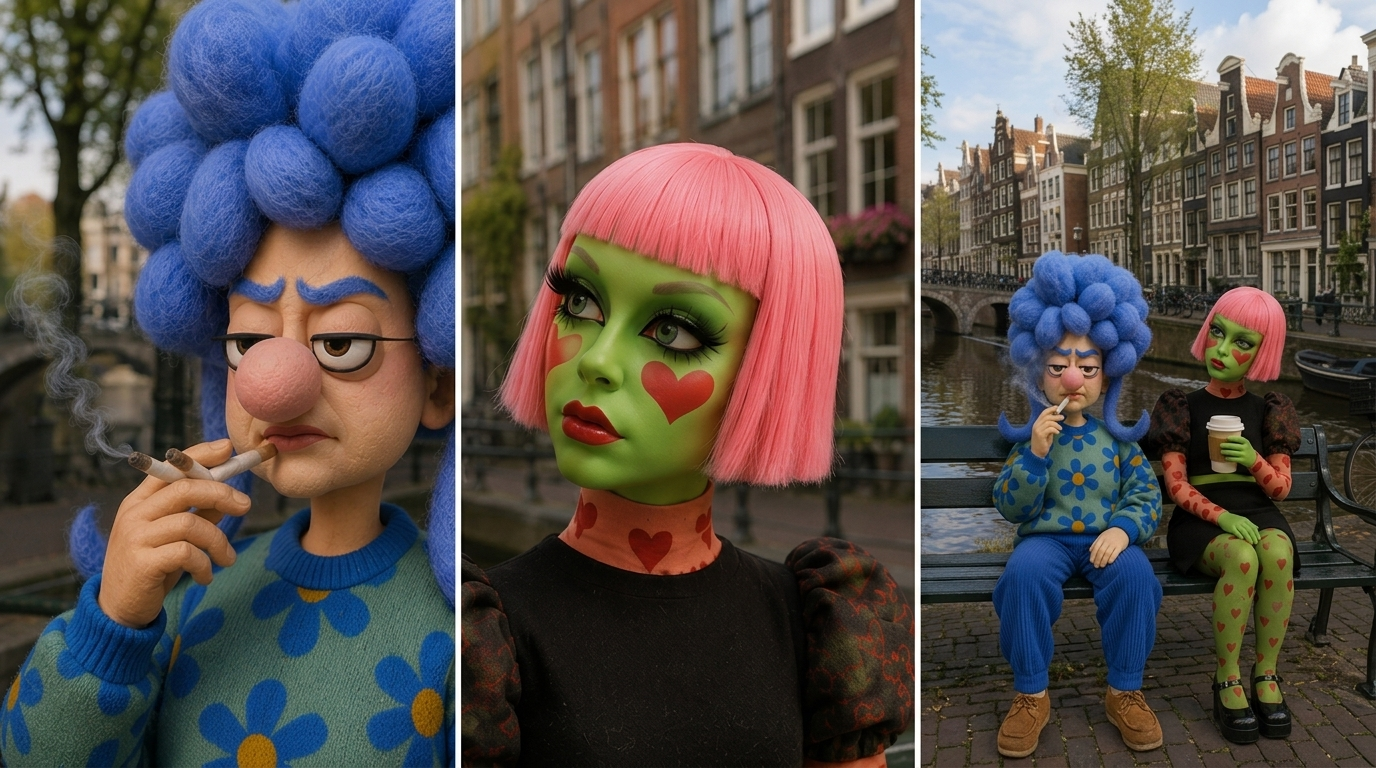
The tools: GPT-4o for image generation (though any image generator will do the job), and Seedance 2 as the video model. Kling could technically work here too, but Seedance is the smoothest and most capable option available right now — so that’s what this guide is built around.
One thing worth noting about the dialogue length: my dialogue runs around 30 seconds, but Seedance 2 caps audio input at 13 seconds. So I generated only the first half in ElevenLabs — exactly 13 seconds — and then built the second half separately, using the output from the first generation as a prompt for the continuation.
Upload all three images and the audio file into Seedance. Once they’re in, use the following prompt:
Use the attached audio file as the master dialogue track and build the scene timing around it.
Shot 1 (0-2s) - Wide Establishing Shot
Both characters sit on the bench beside the Amsterdam canal. Calm atmosphere, subtle idle movements, natural breathing, slight head movements. No dialogue. Establish the relationship between the two characters and the environment.
Shot 2 (2-8s) - Medium Close-Up on the Young Woman
Focus on the young woman with green skin and pink hair. She looks thoughtful and slightly unsettled, gazing away toward the canal as she speaks. Subtle eye movements, natural blinking, introspective expression. Sync lip movements precisely to the audio.
Shot 3 (8-16s) - Medium Close-Up on the Older Woman
Cut to the older woman with blue hair. She slowly turns her eyes toward the young woman while smoking. Calm, philosophical delivery with minimal movement. Slight cigarette motion, subtle facial expressions, occasional blink. Sync lip movements precisely to the audio.
Style: Cinematic, realistic puppet characters, shallow depth of field, natural lighting, smooth cuts, high facial detail, believable eye contact, subtle performance, Amsterdam canal background consistent across all shots. Use the attached audio for dialogue timing and lip sync.
After running the prompt, I got this:
Then I uploaded that first video back into Seedance — no images, no audio file this time. Just a text prompt asking it to continue, with the exact dialogue lines for each character:
Extend this video. The young woman is saying "then who's listening to me right now?". The old woman answers: "Maybe the part of you that doesn't need a name to exist."
What We Just Learned
- Seedance 2 handles multiple reference images simultaneously — no need to split the scene into separate shots manually
- The model accepts an audio file as input — and syncs lip movements with surprising accuracy
- Seedance can build continuity — the first generated video becomes the foundation for the second
If you want to go deeper on working with AI animation and building complex scenes, there are more guides on the Electric Puma blog.
Follow us on TikTok for more AI filmmaking content.